TopScan
- 3.1
- Rating
- 100.00K
- Installs
- Free
- Price
 Analysis by App-foxy
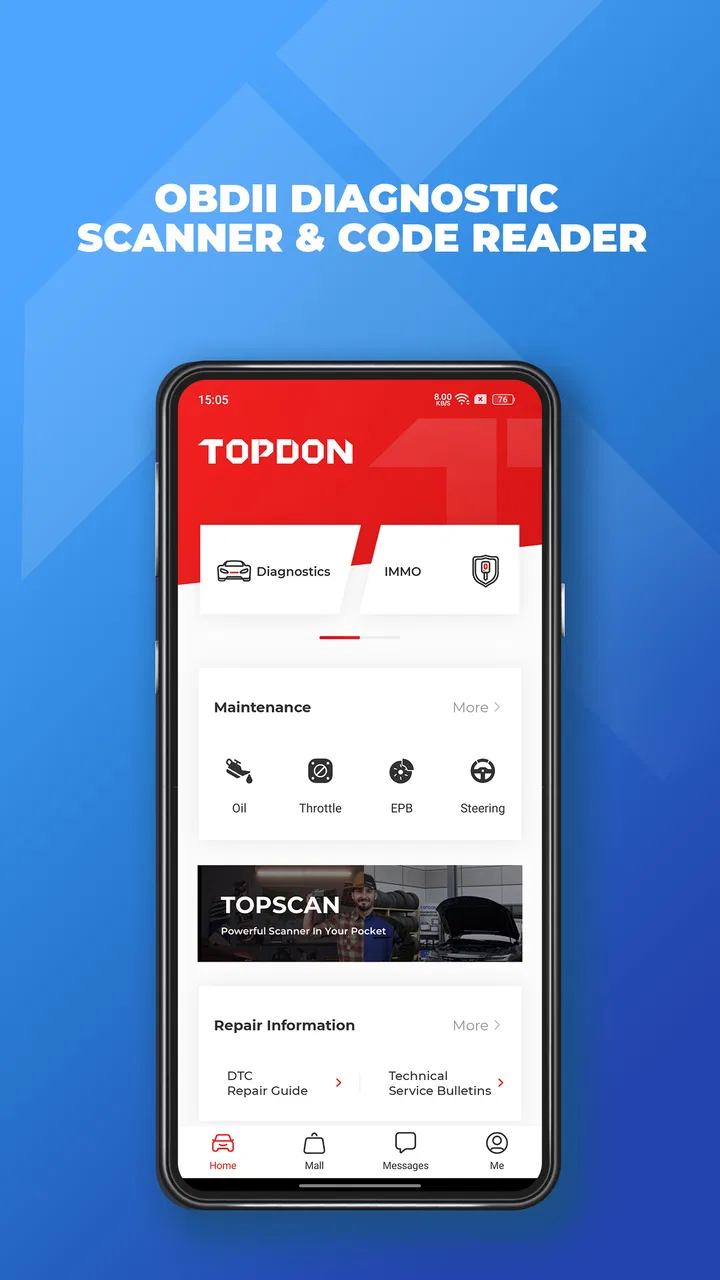
I first looked at TopScan as the sort of tool people install only after a warning light appears, but it quickly became clear that its usefulness depends on how a household handles car maintenance. This is an OBDII diagnostic app from TopDon, designed to work with a compatible vehicle interface and turn a phone into a code-reading screen. It is free to install, aimed at Everyone, and sits in the Tools category rather than trying to be a general car-management app.
My honest view is that TopScan makes the most sense for a shared household where more than one person may need to understand what a dashboard warning means. It can help a driver gather information before calling a repair shop, check whether a problem has returned, or avoid guessing when a light appears on the way to work. It is not a substitute for mechanical judgment, and the quality of the experience depends heavily on the vehicle, the adapter, the phone, and the user’s ability to interpret diagnostic information carefully.
How TopScan fits into a shared household
A realistic example is a family with one primary driver, one occasional driver, and a vehicle that is used for commuting, errands, and school runs. If the check-engine light appears while one person is away from home, that driver may be able to connect the diagnostic equipment, read the stored code, and send the result to the person who usually handles maintenance. That is a more useful conversation than simply saying, “The car light came on.”
You May Also Like

 Blood Strike: 2.5 Anniversary
Blood Strike’s Loadouts Turn Every Drop Into a Tactical Gamble
A close look at Blood Strike’s custom loadouts: how fast access to signature weapons reshapes its battle royale rhythm, rewards preparation, and narrows the gap between fights.

 Pandora - Music & Podcasts
Pandora’s Music Is Easy to Start, but Harder to Recover
Pandora’s strength is its low-effort path from a seed to a station. Its weak spot is how much confidence it asks you to place in connection, setup, and quiet recovery.

 8 Ball Pool
 Is Built on Rivalries, Rematches, and Routine
A close look at the rivalries, rematches, shared routines, and unanswered safety questions that turn a quick pool match into a persistent mobile community.

 Samsung Music
’s Quiet Strength Is Playing What You Already Own
Its reach comes less from spectacle than from dependable access to a personal library. That simplicity is both the app’s strongest retention engine and its ceiling.

 AccuWeather: Weather Radar
AccuWeather Review: A Quick, Clear Forecast for Everyday Decisions
For everyday plans, the best forecast is the one you can understand quickly. AccuWeather makes rain timing, radar, and local conditions easy to act on, with a few trade-offs.

 Hill Climb Racing
Why Hill Climb Racing Still Turns Crashes Into One More Run
A tiny car, a bumpy hill and one more upgrade: Hill Climb Racing keeps resurfacing because its simple chaos makes every near-miss feel personal.
More From Our News Desk



In this situation, the app’s value is not that it magically identifies every repair. Its value is that it can create a common starting point. A code can help the household decide whether to arrange a prompt inspection, monitor the vehicle carefully, or contact a garage with better information. I like that practical role because it reduces the confusion that often surrounds warning lights without pretending that a phone can replace a trained technician.
TopScan is also useful when a car is shared between people with different levels of confidence. One person may know how to locate the diagnostic socket, while another may be more comfortable reading instructions on a phone. The app can support that handoff, provided both people understand that reading a code is only one step in diagnosing a fault.
That distinction matters. A diagnostic code normally points toward a system or condition, not necessarily one exact failed part. Replacing a component based only on a code can waste money. I would use TopScan to collect evidence, record what the car is reporting, and decide what to ask next—not to treat the first result as a final repair order.
The app has reached over one hundred thousand installs, which suggests that it is being used beyond a tiny group of professional testers. Its average rating is 3.1, so I would approach it with realistic expectations rather than assuming every setup will be effortless. That rating is important context for a household deciding whether a free download is worth trying: there is little financial risk in installing it, but there may be time spent working through compatibility or connection problems.
Starting with the right expectations
The first question I would ask before installing is not “Can this app diagnose my car?” It is “Do I have the compatible TopDon hardware and a supported vehicle?” TopScan is an OBDII diagnostic scan tool and code reader, so the phone application is only one part of the arrangement. Without the appropriate connection between the vehicle and the phone, the app cannot do the practical work people expect from it.
This is especially important on a shared device. A household may have one Android phone that belongs to a parent, another phone used by a partner, and perhaps an older spare handset kept in the car. The app’s store summary specifically warns that it cannot support 32-bit cell phones. I would check the phone’s architecture before spending time on setup, particularly if the device is old or has been kept as an emergency backup.
On Android, the minimum operating-system requirement is Android 7.0. That is broad enough to include many older phones, but operating-system support alone does not guarantee a smooth experience. A phone can meet the minimum and still be inconvenient because of weak battery life, limited storage, unreliable wireless behavior, or a screen that is difficult to read outdoors.
TopScan’s current version is 6.40.100. In practical terms, I would keep the app updated on the phone that is most likely to be used for vehicle checks, but I would not assume that updating solves every connection issue. If a household depends on one shared phone, it is sensible to test the app and adapter together before an urgent warning-light situation occurs.
Keeping setup responsibilities clear
Shared use becomes easier when one person takes responsibility for the initial setup. That person can install the app, confirm that the phone meets the requirements, pair or connect the compatible equipment as required, and perform a test with the vehicle parked safely. After that, other household members can use the established arrangement without changing settings at random.
I would avoid creating a confusing setup where several people install the app on different phones and each person tries a different connection method. If something fails, it becomes difficult to tell whether the issue is the vehicle, the adapter, the phone, or the app. A short written note kept with the vehicle can help: which phone worked, where the diagnostic socket is, how the adapter connects, and who should be contacted if a code appears.
That is not a feature claim about TopScan; it is a workflow recommendation based on how shared tools tend to fail. The app becomes more useful when the household treats it like a small maintenance process rather than a one-click answer.
I would also make sure the car is parked securely before connecting anything and that the person using the app is not trying to read results while driving. A passenger can assist, but the driver should focus on the road. This sounds obvious, yet warning lights often appear during stressful moments, which is exactly when a simple household rule helps.
Coordinating information instead of passing around guesses
One of the strongest household uses is coordination. If one person reads a diagnostic result, they should share the exact code and the circumstances in which it appeared. Was the warning light steady or flashing? Did the car feel different? Did the light appear after refueling, during a cold start, or while climbing a hill? TopScan can provide a technical clue, but the surrounding observations make that clue more useful.
I would encourage users to keep a simple maintenance note with the date, mileage if they normally record it, the code shown, and any symptoms. I am not presenting that as an in-app feature. It can be a paper note or a household document. The benefit is that different drivers do not repeat the same check without knowing what happened earlier.
This approach also helps when speaking with a mechanic. Instead of handing over a vague description, the household can explain what the app reported and what the vehicle was doing at the time. A mechanic may still need to run professional tests, but the initial conversation starts with better information.
There is a trade-off here: more information can sometimes create false confidence. A household member may search a code online, find a likely cause, and assume the repair is obvious. I would treat TopScan’s output as a prompt for investigation. If the car is running poorly, losing power, overheating, producing unusual smells, or showing a flashing warning light, the sensible response is to prioritize safety and professional assistance rather than continuing to experiment with the app.
Another useful habit is to distinguish between reading and clearing. If the app offers an action that affects stored diagnostic information, I would not use it casually. Clearing a code may turn off a warning temporarily without fixing the underlying fault, and it can remove information that a technician would want to see. For a shared household, the rule should be simple: record the result first, discuss it, and only clear anything when the reason is understood.
Account boundaries and device ownership
Households should decide who controls the device and any account-related activity before everyone begins using the app. TopScan is free to download, but in-app purchases range from $0.99 to $179.99 per item. That makes it worth paying attention to purchase boundaries, especially when the phone is shared or when several people use the same app-store account.
I would keep purchase approval with the adult who manages vehicle expenses and avoid letting a child or occasional user make decisions about paid functions without permission. The exact availability of any paid capability should be checked inside the app, but the important household point is that “free” does not necessarily mean every function or service is free. A shared phone should have a clear rule about who may approve an in-app purchase.
It is also wise to separate vehicle responsibility from phone ownership. The person whose phone runs TopScan may not be the person who pays for repairs. If the app is used on a partner’s device, the result should still be shared with the person coordinating maintenance. That prevents a useful diagnostic clue from remaining trapped on one phone.
I would not create multiple household accounts simply for the sake of appearances unless the app’s own workflow requires it. More accounts can mean more forgotten passwords, unclear purchase histories, and uncertainty about which device is connected. On the other hand, if different adults need separate access for privacy or billing reasons, each person should understand that the app’s behavior may depend on the account and hardware arrangement. Keeping those boundaries explicit is safer than assuming every phone will behave identically.
Age, trust, and sensible supervision
The content rating is Everyone, but that does not mean every child should operate the diagnostic setup alone. The technical information may be suitable for a broad audience, while the physical context involves a vehicle, electrical connections, and decisions about whether a car is safe to drive. I would be comfortable letting an older child help record a code or observe the process, but an adult should handle the safety decision and any purchase.
This is also a trust issue. A young user might see a warning light as a challenge to solve quickly and clear it without understanding the consequences. A household rule that says “read and record first; never erase a warning without permission” is more valuable than relying on age labels alone.
For teenagers who drive a shared car, TopScan can support responsible communication. They can report a warning with a code and symptoms rather than hiding it or assuming it will disappear. That can make the app useful as part of a maintenance culture, not as a replacement for adult judgment.
At the same time, I would not hand the app to someone who is likely to test functions while the car is moving or who may interpret technical language too literally. The best user is curious, careful, and willing to ask for help. The least suitable user is someone looking for a shortcut around a repair inspection.
Where it beats ordinary alternatives
Compared with doing nothing and taking the vehicle straight to a garage, TopScan can give a household a clearer first conversation. It may help identify whether the warning relates to a system that needs prompt attention and can make repeated visits less frustrating when a light returns.
Compared with a basic standalone code reader, the phone-based approach can be more convenient for people who already carry a smartphone. A larger screen may be easier for sharing results, and a household can keep the same familiar device available for different drivers. The downside is that the experience depends on the phone, the connection, software compatibility, and the required TopDon hardware. A dedicated reader can feel simpler when a workshop wants a tool that is always ready in a toolbox.
Compared with a professional scan tool, TopScan is not the choice I would make for advanced workshop diagnosis or a mechanic who needs broad testing depth and dependable service functions. Professional equipment is built around deeper vehicle access, specialized workflows, and repair decisions. TopScan is better viewed as an accessible first layer for owners who want information before deciding what to do next.
Compared with generic diagnostic apps, the advantage here is its connection to the TopDon ecosystem rather than a promise that any adapter will work. That focus can be helpful if the household already owns compatible TopDon equipment. It is less attractive if someone has a random OBDII adapter and expects every app to recognize it automatically.
Who should use it and who should skip it
I would recommend trying TopScan if you own a compatible setup, share a vehicle, and want a practical way to collect diagnostic information before calling a repair shop. It is particularly suitable for a careful car owner who is comfortable following instructions, recording results, and accepting that a code may need professional interpretation.
I would skip it if your main goal is a complete repair diagnosis with no learning curve. I would also skip it if your phone is a 32-bit model, if it does not meet the Android requirement, or if you do not have compatible hardware. Installing the app alone will not turn an unsupported phone or an incompatible adapter into a working scan tool.
It may also be the wrong choice for someone who only wants to reset warning lights. That approach can hide useful evidence and delay a proper repair. If the vehicle has serious symptoms, the app should not become a reason to keep driving or repeatedly erase codes.
My household verdict
After looking at TopScan as a shared household tool rather than a novelty, I see a useful but limited role for it. The free price makes it easy to test, and the Everyone rating makes it broadly approachable, but the real decision depends on compatible hardware, phone support, and the discipline to interpret results responsibly. The in-app purchase range also means adults should establish clear spending boundaries before sharing the device.
TopDon has built something that can help ordinary drivers speak more clearly about vehicle problems. I especially like the possibility of one person reading the code while another coordinates the repair, because that is where a phone-based diagnostic tool can provide genuine everyday value. The strongest workflow is to test it while the car is healthy, keep the setup consistent, record codes before taking action, and treat the result as evidence rather than a verdict.
My final recommendation is cautious but positive: TopScan is worth trying for households that already have the right equipment and want a convenient first look at OBDII information. It is not the right answer for advanced workshop work, unsupported phones, or anyone expecting the app to identify and fix a fault automatically. Used with clear boundaries and sensible supervision, TopScan is most valuable as a shared information tool, not as a replacement for a mechanic.
FAQs for TopScan
01What is TopScan, and what can I use it for?
TopScan is a vehicle diagnostic application designed to work with compatible OBD2 adapters, allowing users to check vehicle information from a smartphone or tablet. Depending on the adapter, vehicle, and subscription level, it may read and clear fault codes, display live data, perform selected service functions, and provide diagnostic reports. Its exact capabilities vary considerably between car brands and models.
02Is TopScan compatible with my car and smartphone?
Compatibility should be checked before downloading or purchasing an adapter. TopScan generally requires a supported Android or iOS device, Bluetooth or another approved wireless connection, and a vehicle with a compatible OBD2 diagnostic port. Basic OBD2 functions may work on many vehicles, while advanced functions are often limited by manufacturer, model year, engine system, adapter version, and regional availability.
03Do I need to buy additional hardware to use TopScan?
Yes, the app normally requires a compatible TopScan or supported OBD2 diagnostic adapter connected to the vehicle. The application itself cannot communicate with the car without this hardware. Before buying, confirm that the adapter is genuine, supports your phone’s operating system, and includes the functions you need. Some advanced tools may also require an in-app purchase or subscription.
04Can TopScan clear warning lights and diagnose serious vehicle problems?
TopScan can often read diagnostic trouble codes and may clear certain codes when the connected vehicle supports that function. However, clearing a warning light does not repair the underlying problem, and some faults return immediately or require professional equipment. The app should be treated as a helpful diagnostic aid rather than a replacement for a qualified mechanic, especially for safety-related systems.
05Is TopScan suitable for beginners, and are there any risks when using it?
TopScan can be approachable for beginners because it presents vehicle data and fault codes through a mobile interface, but interpreting diagnostic information still requires care. Users should keep the ignition and engine instructions in mind, avoid interrupting programming procedures, and never change coding or service settings without understanding the consequences. Incorrect actions could affect vehicle operation, so important repairs should be verified professionally.
Pros
- Guided diagnostics make vehicle scanning accessible to beginners.
- Can help identify issues before visiting a repair shop.
- Useful for checking engine fault codes at home.
- Supports quick scans through a compatible OBD2 adapter.
- May reduce unnecessary diagnostic fees for simple problems.
Cons
- Requires a compatible OBD2 scanner and a supported vehicle.
- Some advanced functions may require in-app purchases.
- Results can be too technical for users without car knowledge.
- A code description does not always reveal the exact faulty part.
- Older vehicles may have limited compatibility or available data.

TopScan
Gallery